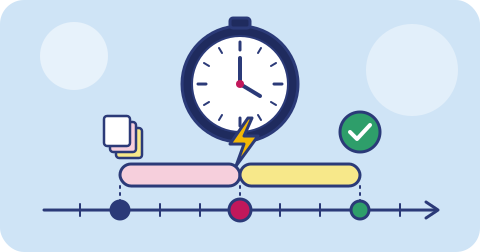
Two acronyms come up in every serious backup conversation: RPO and RTO. They sound like jargon, but they answer the two questions any business owner asks after a failure: how much did we lose, and how long until we are working again?
Recovery Point Objective (RPO)
RPO is the maximum amount of data, measured in time, that you are willing to lose.
If your RPO is 24 hours, you accept that after a failure you might lose up to a day of work. If your RPO is 15 minutes, you can lose at most the last 15 minutes.
RPO is mostly decided by how often you back up. Nightly backups give you an RPO of roughly 24 hours. Hourly backups give roughly an hour. Continuous replication or database log shipping can bring it down to minutes or seconds.
Example
A small accounting firm backs up its file server every night at 11 pm. The server fails at 4 pm. Everything created or edited since 11 pm the previous night is lost: about 17 hours of work. Their effective RPO is up to 24 hours.
Recovery Time Objective (RTO)
RTO is the maximum time you are willing to be down before a system is working again.
If your RTO is 4 hours, you need to be able to restore and restart within 4 hours of a failure. If it is 2 days, you have more room.
RTO is decided by many things:
- how quickly you notice the problem
- how quickly you can get replacement hardware or a cloud server
- how much data needs to be restored, and how fast you can download it
- how well documented and practised the restore process is
Example
The same firm has 800 GB on the server. Their backup is in the cloud. With a 100 Mbps office connection, downloading 800 GB takes the better part of a day before anything else happens. Add time to get a new machine, install the operating system and reconfigure software, and their realistic RTO is two or three days, whatever they had hoped.
RPO is about how far back you go. RTO is about how long it takes to get there. They are different problems with different solutions.
Why they are different
It is common to improve one and forget the other:
| Improvement | Helps RPO | Helps RTO |
|---|---|---|
| Backing up more often | Yes | No |
| Database log shipping (WAL archiving) | Yes | Somewhat |
| A local backup copy on a NAS | No | Yes, faster restores |
| A standby server ready to go | No | Yes |
| Written, practised restore runbook | No | Yes |
| Faster internet connection | No | Yes, for cloud restores |
A business with hourly backups to a distant cloud bucket has a good RPO but may have a poor RTO. A business with a fast local NAS backed up once a week has the reverse.
How to choose your numbers
Do not start from technology. Start from the business:
- List your systems. Accounting software, email, the customer database, shared files, the website.
- For each, ask: what does an hour of downtime cost? Lost sales, idle staff, penalties, reputation. Rough figures in rupees are fine.
- Ask: what does losing an hour of data cost? Re-entering invoices is annoying; losing orders that customers already paid for is worse.
- Group systems into tiers. For example: - Tier 1: billing and orders. RPO 15 minutes, RTO 4 hours. - Tier 2: file server and email. RPO 24 hours, RTO 1 day. - Tier 3: archives and old projects. RPO 1 week, RTO 1 week.
- Price the options. Tighter numbers cost more: more storage, more frequent jobs, standby systems. Decide where the cost is worth it.
Most small businesses do not need every system at the strictest tier. Being honest about which ones do is where the savings come from.
Designing to meet them
For a tight RPO
- Use database-native continuous archiving (for Postgres, tools like pgBackRest or WAL-G) rather than only nightly dumps.
- Back up file shares several times a day, using a tool that sends only changes.
- Make sure jobs alert you when they fail; a missed backup silently doubles your RPO.
For a tight RTO
- Keep a recent copy close to where you will restore, such as a local NAS or the same cloud region as your servers.
- Write down the restore steps, including passwords and where the keys are, and keep them somewhere other than the server you are restoring.
- Automate the rebuild where you can, so restoring is running a script, not remembering steps.
- Test regularly, and time the test.
Do not forget the far copy
A local or same-region copy is fast to restore, but it shares risks with production. The far copy (another region, another provider) is slower to restore but protects against the events that take out everything nearby. You usually want both: the near copy for RTO, the far copy for survival.
Write it down
A one-page table of systems, tiers, target RPO and RTO, and the last tested result is one of the most useful documents a small business can have. Review it whenever you add a system or change providers.
Closing note
triplicate’s business backup is being built to work with the tools mentioned here, including pgBackRest, WAL-G and restic, through an S3-compatible endpoint, with copies in two regions on different providers. We are launching soon; see integrations or talk to us about your recovery targets.
Keep reading
Ransomware recovery for small businesses
What to do in the first hours after ransomware hits a small business, how backups decide the outcome, and how to prepare before it happens.
3-2-1-1-0: immutable backups and verified restores
The extended backup rule adds one offline or immutable copy and zero errors after verification. What each addition means and how to put it into practice.
How to back up an IMAP mailbox
Step-by-step: back up Gmail, Zoho Mail, Outlook or any IMAP mailbox using app passwords, IMAP sync tools and mbox exports, and keep the copy useful.